


Chemistry World

Showing posts with label Blogging. Show all posts

Friday, July 16, 2010

0 Do you want to Add Google Talk to Blog


Do you want to add google talk in your blog. Simply do these steps to get it -----

1. Login to your blogging account
2. Now go to your blog's dashboard and click on to the layout/design
3. Now simply click on the "Add new gadget"
4. Select Html/Javascripts
5. Name it Google Talk and paste the javascrits given below-------------


Add to your blog


6. Lastly publish it...

You are done...

Read More...

Tuesday, July 6, 2010

0 * Home * MAIL ME How to submit your site into Top 3 search Engines? (Bergner’s SEO)

In recent time I was made a think that how to summit my blog into top search engines. That’s why I was made a tutorial for every. For this I was shared with everyone.

Let’s go & see how to submit……….

The first one is Google (Big Boss of Search Engines)

1. Here you can look a page by entering the address- http://www.google.com/addurl on your browser address bar. Look Below……

2. Now input your Blog Address beside URL option, write some Comments for your blog & enter the verification Captcha, Then Click Add URL button. Look Below …..


3. A confirmation message will be displayed on the next page. Then you confirmed that your blog was successfully submitted.


The Second one is Yahoo! the best competitive partner for Google.

4. Enter the http://siteexplorer.search.yahoo.com/submit for submitting your blog into Yahoo! search engine.
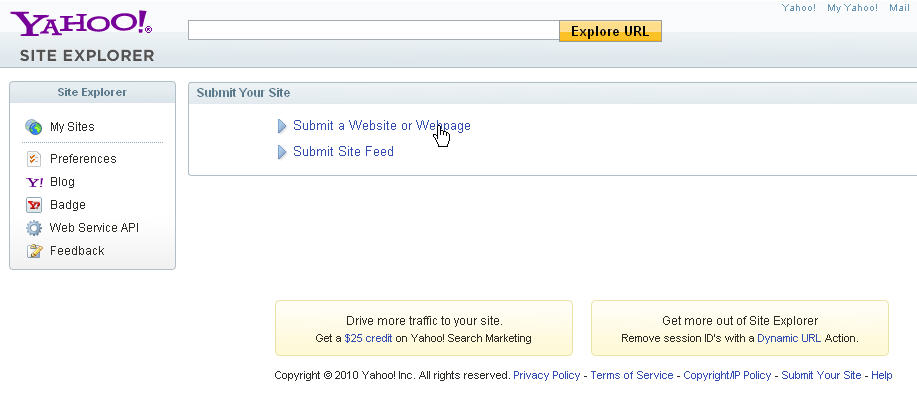
5. Then a page will appear. Look Below..

6. Now, click the Submit a Website or Webpage Link, Now a box will appear. Look below……

7. Enter the blog name & then click Submit URL button. Then the page below will appear with that information.


8. Now, you can sure that your blog address in successfully added to Yahoo! search engine.


The Third one Bign! Recently Microsoft Popular Search Engine Bign

Now you can see the process of submitting your blog into Bign search engine.
9. Firstly, enter The link that is http://www.bing.com/docs/submit.aspx ,
10. Then the page below will appear …


11. Enter the Captcha code into the Characters box & type the URL that you want to Submit. Then Click the Submit URL button. Look below….

12. Finally the page below will appear with a confirmation message. Look below…..

Note: Your submitting of blog into top 3 search engines has been completed. How about it guise? I think it very simple to submit. Aren’t i?
Read More...

Monday, July 5, 2010

0 How to submit website in over 200 search engine at one click


We the Blogger or Webmaster knows very well that how importance Search Engine Optimization (SEO) is for getting top targeted visitors to our blog. Normally we submitted our blog or website into Google, Yahoo & Bing search engine. But in the search engine world there have many search engines out of our knowledge. By submitting our blog in these search engines we will get lot of traffic daily. For this our blog get a top level rank into search engine & also enlarge our publisher earning, like- AdSense , Adbrite, Bidvertiser, Clicksor, Infolinks etc.

Now, today I will share a link that has included over 200 search engine for submitting our blog. Let’s go and see how to do that.......
  1. First of all go to the link- http://freeenginesubmission.tk/
  2. Now Enter your blog & email address there. Then click submit button.


3. After 2 or 3 minutes latter, all the search engines submit your blog or website automatically. Look the results below.....

I think it’s so easy to submit any URL for us all.

Happy Blogging.

Read More...